

The Calendar is the spine of the product. Do this scan once a week and you're already ahead of most people who own the same stocks you do.
What you're looking at
US earnings reports grouped by date. Free users see a 7-day window. Pro sees three years of history plus the full forward calendar.
Each row gives you ticker, company, BMO (before market open) or AMC (after market close), market cap, sector, EPS and revenue estimates (and actuals once reported), guidance ranges, and an importance rating from 0 to 5.
When a print is in the past, the row also shows what the stock did after — 1d, 1w, 1m, and through to the next call. That's the data you can't get anywhere else for free.
Two views
Weekly is the default. Seven days at a glance, split into BMO and AMC per day. Best for "what's the week look like?"
Monthly is the full grid. Each day cell renders ticker logos in BMO/AMC/TBD sections. Best for "when's my watchlist next reporting?" Click any day to drill in.
Three ways to use it
Sunday-night look-ahead (5 min)
Open the Calendar in Weekly view on Sunday evening. Scan BMO and AMC for each day. You're looking for: anything on your Watchlist, mega-caps reporting (their commentary will set tone for adjacent sectors you do own), and importance 4-5 names you don't recognize. This week's calendar has roughly 150 events. You'll care about about 12 of them. That's the point.
Sector setup read
Open Monthly, find the week you care about, click into days where multiple names in the same sector report. Read them chronologically.
Common pattern: a smaller name in a sector reports first and pops on a beat. The mega-cap reports a week later and the market has already priced in the read-through. Recent example: SLAB printed Feb 4 2026 and ran +32.6% in a day. ICHR followed Feb 9 and ran +24.3%. Anyone who saw the SLAB read-through had five trading days to get long the rest of the semi cap-equip cluster.
Post-ER drift hunting
Click into a past day. Look for the ticker that beat and held the gains a week later. That's a stock with real follow-through.
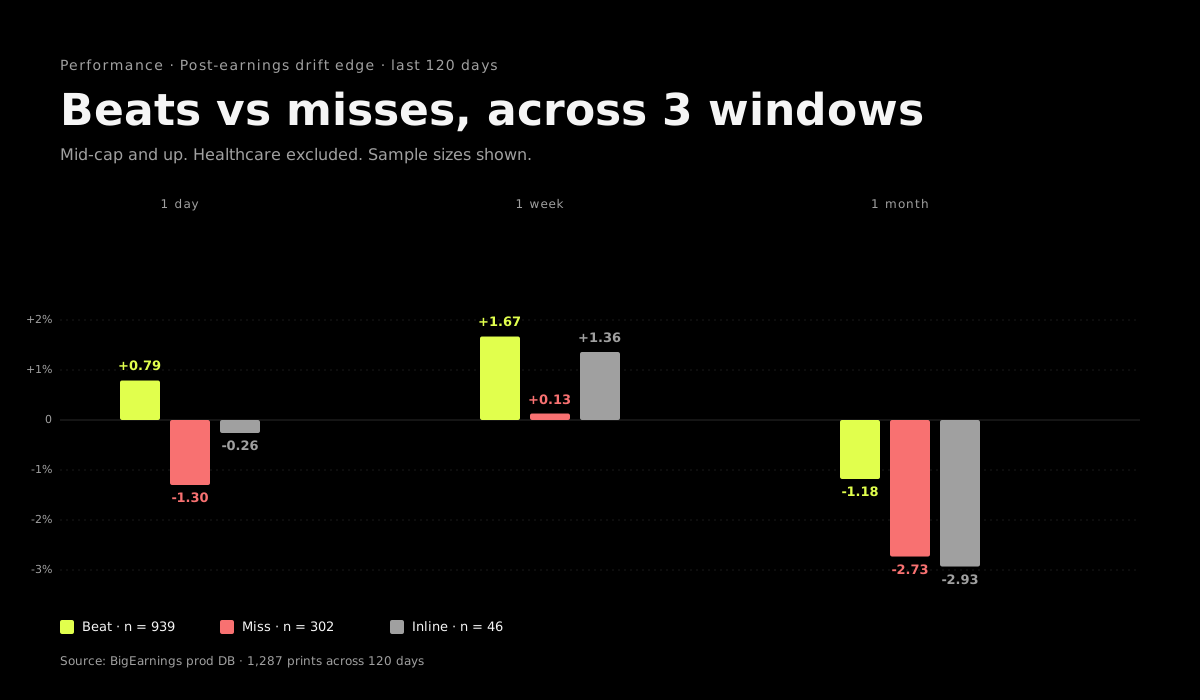
Across 939 mid-cap+ beats in the last 120 days, beats averaged +0.79% next-day and +1.67% one week out. Misses averaged -1.30% and +0.13%. That ~2pp day-1 spread is the post-earnings drift edge. It isn't huge on any single name. It's huge when you stack it across the right set. The Performance guide goes deeper.
Filters worth knowing
- Importance — Pro filter, bucketed (All / 5 / 4 / lower). Cuts noise on busy weeks.
- Date status — toggle confirmed vs projected. Projected dates can shift, so don't build a trade calendar around them.
- Market cap minimum — if you only trade $5B+ names, set the floor.
What's gated
Free sees 7 days. Pro sees three years of history and the full forward calendar. The history matters because last year's earnings reaction tells you how a name typically trades around prints. You'll want it before every position you size into an earnings event.
The share button
Top-right of the weekly view. Generates a PNG of the week's top earnings, split by BMO/AMC. Send it to your group chat, post it to X, drop it in your journal. We use the same image generator for our own weekly tweet.
Where to go next
The Calendar is just the trigger. The real work happens in the flows that wrap around it: