

Every past earnings print and what the stock did after, on one page. Public, SEO-indexed, accessible without an account. The top 20 tickers are prerendered; the rest are ISR-cached for an hour.
What's on the page
In rendering order:
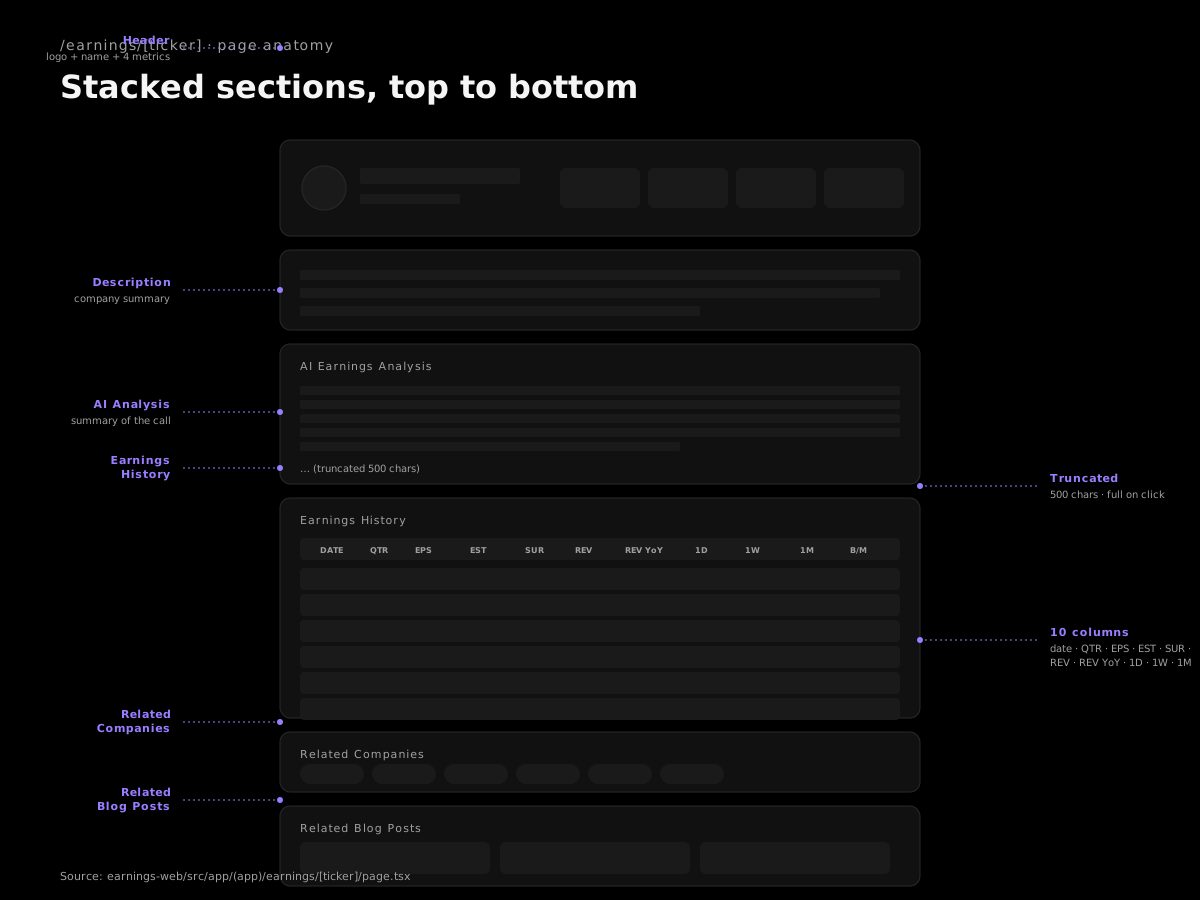
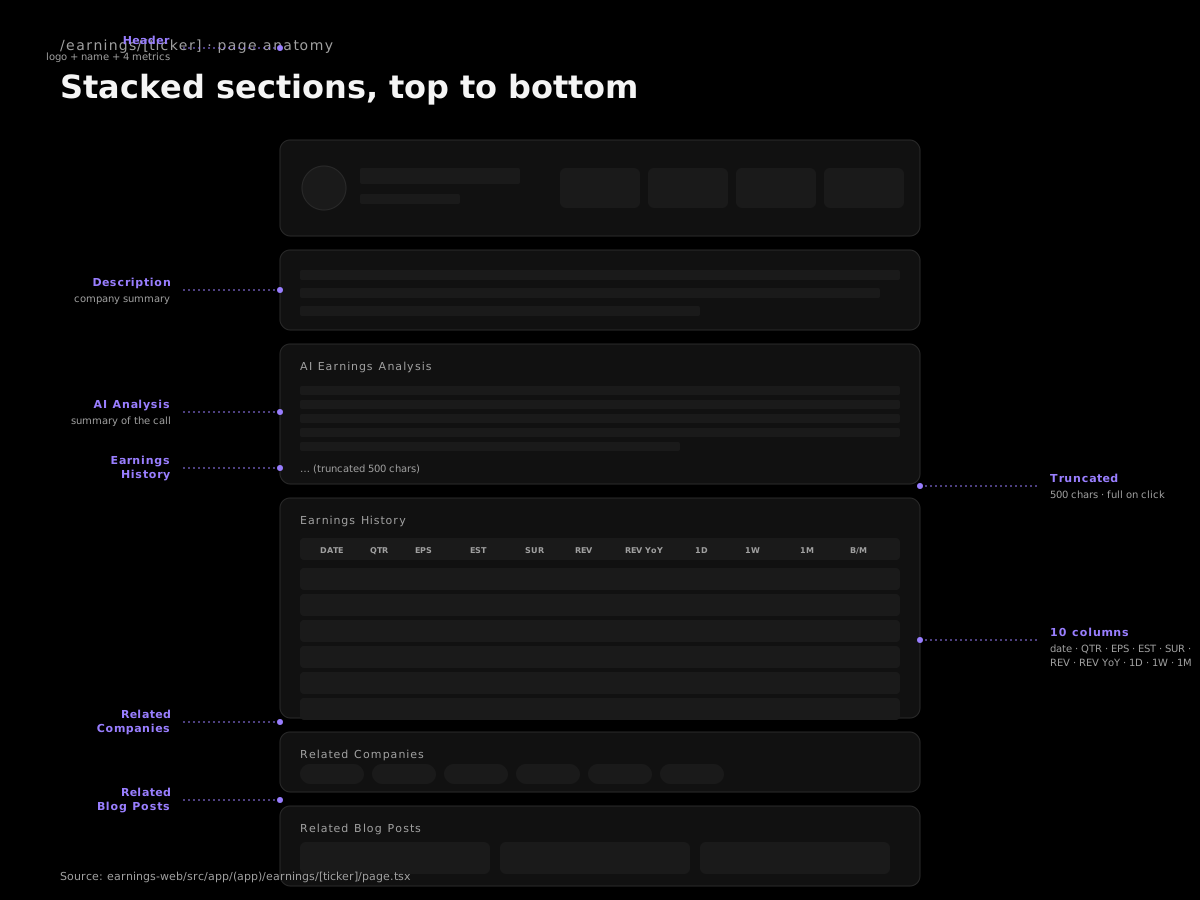
- Header — name, logo, current price, market cap, P/E, 52-week range
- Company description + sector / industry / website
- AI Earnings Analysis — a paragraph summary (truncated at 500 chars)
- Earnings history table — every past print with Date, Period, EPS Est, EPS Act, Surprise, Revenue, Result, 1D Δ, 1W Δ, 1M Δ
- Related companies — peer ticker pills you can click to navigate
- Related blog content — any post we've written that mentions this ticker
How to read the earnings history table
The table is the single most valuable artifact on the page. Each row is one quarterly event. The columns that matter most: Result (beat / miss / inline), Surprise (bigger surprises drift longer), and 1D / 1W / 1M deltas (what the stock actually did).
Scan the last 6-8 rows. You're trying to answer:
- Does this stock pop on beats?
- Does it hold the pop or fade?
- How does it react to in-line or mixed prints?
- Is there a quarter-over-quarter trend in the magnitude of beats?
A real example — NVDA
| Date | Period | Result | EPS Surp % | 1D | 1W | 1M |
|---|---|---|---|---|---|---|
| 2023-02-22 | Q4 FY23 | beat | +0.1 | +14.0% | +9.4% | +29.0% |
| 2025-05-28 | Q1 FY26 | beat | +0.3 | +3.2% | +5.3% | +17.0% |
| 2025-08-27 | Q2 FY26 | beat | +0.1 | -3.1% | -6.0% | -1.9% |
| 2026-02-25 | Q4 FY26 | beat | +0.1 | +0.2% | -6.4% | -14.3% |
NVDA used to print and rip (Feb 2023, +29% over a month on a tiny surprise). Recent prints still beat, but the stock is fading the move. The post-earnings reaction has structurally changed. You can't get that read from a one-line summary or a price chart.
A "compounder" example — PLTR Q4 2023
Reported Feb 5, 2024. EPS beat by +0.1 (small surprise). +30.8% next day. +49.8% one week. +56.5% one month. +50.8% three months. Three months after the print, the stock was up over 50% on a 0.1 beat. You don't need to be early; you need to be present.
A "broken story" example — DUOL
Feb 28, 2024 print: +22.2% next day, +11.6% one month. Classic compounder.
Feb 26, 2026 print: -21.5% next day, -18.8% one month. Same company, same playbook. The pattern broke. The DUOL ticker page shows both events back-to-back. If you'd been long into the 2026 print because "DUOL always rips after earnings," you'd have learned an expensive lesson.
A clean-compounder counter-example — AXON
Six straight beats, every reaction positive or mild. The AXON ticker page is what a healthy long-term holding looks like on this view. Compare it to DUOL side-by-side and the difference is unmissable.
How the AI Earnings Analysis works today
The block on this page is a short summary paragraph, capped at 500 characters. The deeper bull/bear/judge structure lives in the AI Report on the Watchlist. To get the full breakdown for an upcoming print: add the ticker to your Watchlist, then open the AI Report from the row. The Watchlist guide covers the full setup.
Workflow inside the page
- Land on the page from Calendar, Top Picks, search, or direct link.
- Read the AI Earnings Analysis paragraph for orientation.
- Scan the history table. Healthy or deteriorating?
- Click related companies to see how peers' tables look.
- Add to Watchlist if you're going to track it through earnings.
- For the bull/bear take, open the AI Report from your watchlist row.